Skip to content

Appointment Booking for Immigration Law Firms

We set up online appointment booking for your law firm: a booking page where people pick a consultation time, calendars that sync with yours, and confirmations and reminders by text and email. It is part of Rocket Reach and is built to get more consultations on the calendar and fewer no-shows.

From ad to booked consultation

Animation in five steps. A video ad from Your Firm is seen on a phone. The viewer sends a short lead form. The firm's AI receptionist replies by text within seconds. A follow-up text arrives with a booking link. A consultation is booked on the calendar and stamped Booked.

Sample lead shown for illustration. Select a step to see it.

How Appointment Booking for Law Firms Works

Booking by phone tag loses people. A lead calls, leaves a message, misses the call back and moves on.

A booking page ends that. The person sees your open times and picks one. The slot goes on the attorney's calendar. A confirmation goes out right away, and reminders follow before the meeting.

It fits your firm if:

  • Scheduling a consultation takes several calls or emails
  • People book and then do not show up
  • Attorneys get double-booked
  • Leads who are ready at night have no way to book

How We Set It Up

  1. Define consultation types. Length, in person, phone or video, free or paid, and which attorney takes which.
  2. Set availability. You choose the hours, buffers between meetings and how far ahead people can book.
  3. Sync calendars. Bookings sync with Google Calendar or Outlook, and existing events block those times.
  4. Add screening questions. A few questions before the calendar, such as case type, so the right people reach the right attorney.
  5. Build the booking page. A simple page with your branding that works on a phone.
  6. Write confirmations and reminders. A confirmation at booking and reminders before the consultation, by text and email. The person can confirm with a reply.
  7. Handle changes. Each message has a link to reschedule. A no-show triggers a rebooking message.
  8. Place the link everywhere. Website, ads, Google Business Profile, email signatures and follow-up texts.

What You Get

  • A branded booking page for your firm
  • Calendars for each attorney or consultation type
  • Two-way sync with Google Calendar or Outlook
  • Screening questions before booking
  • Confirmation messages by SMS and email
  • Reminder messages before each consultation
  • Reschedule and cancel links
  • A rebooking sequence for no-shows
  • Booking links for your website, ads and Google profile
  • Reporting on bookings and show rate

A missed call, answered and booked

Animation in four steps. A caller rings Your Firm after hours and the call is missed. Rocket Reach sends a text back right away. The AI assistant answers the caller's question about a green card and offers two consultation times. The caller picks Thursday at 10 AM and the lead card moves from New lead to Booked in the pipeline.

Sample conversation shown for illustration.

How It Connects to the Rest of the System

Proof

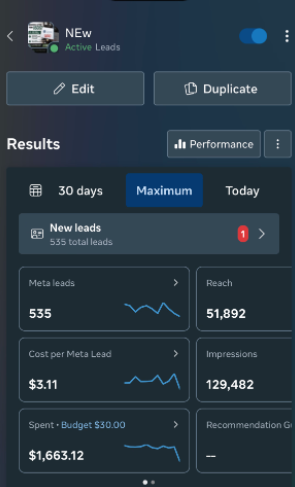
Meta Ads Manager showing 535 leads at $3.11 per lead for Karikari & Associates
$1,663.12 in Meta ads turned into 535 leads and 174 booked consultationsPipeline value is potential case value entered by the firm. It is not collected revenue.

Karikari & Associates, New York (Gerald Karikari, founding partner)

Lead Generation

$1,663.12 in Meta ads turned into 535 leads and 174 booked consultations

  • 535 leads at $3.11 each
  • 174 consultations booked
  • $1,663.12 ad spend

Pipeline value is potential case value entered by the firm. It is not collected revenue.

See results →

Leads were booked straight onto the firm's calendar.

Booked consultations are not the same as attended consultations or signed cases. Reminders are there to close that gap.

What We Need From You

  • Consultation types, lengths and fees
  • Each attorney's available hours
  • Access to connect Google Calendar or Outlook
  • The questions you want asked before booking
  • Your policy on rescheduling and missed consultations
  • Your logo and brand colors for the booking page

Frequently asked questions

How do you reduce no-show appointments?

Confirm right away, remind more than once and make rescheduling easy. A text the day before and another on the day catch most people who would otherwise forget. Screening questions also help, because people who answer them tend to be more serious.

Can people book a consultation outside office hours?

Yes. The booking page is always available and shows only the times you have opened. Someone can book at midnight for a slot during your normal hours.

Does it work with Google Calendar and Outlook?

Yes. Bookings appear on the attorney's calendar, and events already on that calendar block those times on the booking page. That prevents double-booking.

Can we screen people before they book?

Yes. You can ask questions before the calendar appears. In one campaign, the form asked whether the person could invest in starting their case and ended there if the answer was no.

Can people book by phone or text instead of online?

Yes. The AI receptionist offers the same open times on a call or in a chat and books the slot. Your staff can also book for someone from the pipeline.

Facebook Ads for Immigration Lawyers

scripted video ads on Facebook and Instagram, recorded by a presenter.

Learn more →

CRM for Immigration Law Firms

one pipeline and one inbox for every lead.

Learn more →

AI Receptionist

AI voice and chat that answers day and night and books consultations.

Learn more →

Lead Follow-Up Automation

instant replies, missed-call text back and reminders.

Learn more →

All services →

Want a fuller calendar with fewer empty chairs?

Book a call and we will set up booking and reminders for your firm.